Adding your site map to Google webmaster tools is important for getting your blog indexed for google. Here are simple instructions showing how to add your sitemap.

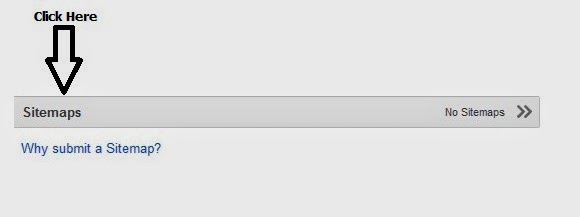




1.Go to google webmaster tools.
2. Log in with your blog credentials.
3.Click on the site you wish to submit the site map for.
4.Click on button “sitemaps”.
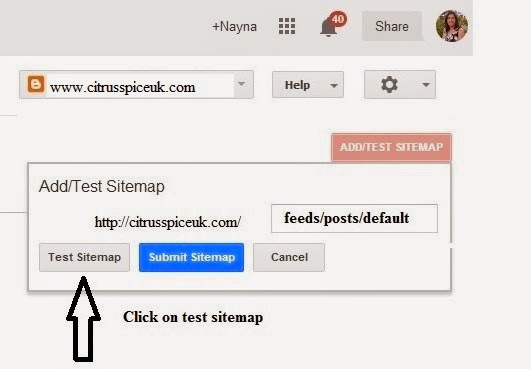
5. A pop up menu will appear showing your blog URL.
6. Next to the blog URL you will see box, in the box type in feeds/posts/default
7. Now click on “test sitemap.”
8. Now click on “view test result.”
You will now see a box at bottom that says no errors This means sitemap is working and the test was successful.
9. Now repeat steps 4-7 again but this time click on “submit site” instead of test site.
You have now successfully submitted your sitemap to Google webmaster tools.
Share this post


Latoyah @ Sugar Pink Food
Ooo this is real;y helpful, thanks! Will have a look at this, great post!
citrusspiceuk@gmail.com
Great to hear its going to be useful to you.
Unknown
didn't know about this, thanks for the step by step 🙂 xo
Unknown
I had no idea about this so helpful !!
citrusspiceuk@gmail.com
I hope that this post will help people to get their blogs indexed.
Unknown
I had no idea about this so helpful thanks!
Susan Evans
Thank you for this tutorial. I haven't submitted my blog to sitemaps yet, even though I've been blogging for 5 years.
citrusspiceuk@gmail.com
Its very simple to do especially if you want to work with brands.
Home Cooked food
what is the use of this ? i dont know thats why i am asking. thanks.
citrusspiceuk@gmail.com
PageRank is an algorithm used by Google Search to rank websites in their search engine results. If you work with brands on product reviews etc , companies will want to know what your page rank is, in order to get this rank you will need to submit your blog sitemap to google for indexing via webmaster tools.
GG
Great clear instructions Nayna.
citrusspiceuk@gmail.com
Thanks GG. It took me a while to work it out and once I did I thought it would be useful to share the instructions.
Unknown
could have done with this a couple months ago when trying to do this! i had to figure it out myself instead.
citrusspiceuk@gmail.com
Yes I wish I had read similar tutorial , I spent hours trying to figure out what to do and it turned out fairly simple so thought to share here to help others.
Unknown
Very helpful. I'm not sure if I have added mine, so will deffo check now x
JustJulie | Beauty Blog
Unknown
Very helpful post! I'm not sure if I've added mine yet, I think I have but can't remember so will double check now x
JustJulie | Beauty Blog
citrusspiceuk@gmail.com
Hope you do Julie.
Face Up Fitness
Ooh fab fab fab. I knew I needed to do this but didn't know how to go about it. Thank you so so much! Tx
My Model Mummy
Thank you Nanya – we will all benefit and you have even made it clear enough for me to use!
citrusspiceuk@gmail.com
I hope so Mary Louise, its good to share good tips when we come across them.
London Unattached
Blogger seems at once simpler and more complicated than wordpress. Glad I use the latter, but hope your post helps some blogger users
citrusspiceuk@gmail.com
Fiona, I think word press has lots of plugins that blogger does not.But at least it encourages to learn and share new things with each other.
Twinsplustwo – Emma-Kate Thompson
You have no idea what you've got me into lol!!! Very complex but very fascinating – am now looking at all the other things I can tweak! V useful post, thanks!
Mina Joshi
Thanks Nayna. Very well explained.
citrusspiceuk@gmail.com
You are welcome Mina.
Michelle
Thank you so much for this. I had no idea. I've passed this on to my tech support (hubby) to do this for me. Popping over from http://www.mummy2monkeys.co.uk
citrusspiceuk@gmail.com
I hope you find it useful.
Helen – Blogging Beautifully
Thanks for the useful post, very informative!
Helen X
citrusspiceuk@gmail.com
I hope it helps others as I found it hard not knowing how to add it on my site at first.
Globalmouse
So is this only for blogger or should everyone do it? Thank you for sharing your tips!
citrusspiceuk@gmail.com
These instructions are for blogger blog I am not sure how wordpress works. Sorry
you baby me mummy
I need wp instructions. Sure it will help loads of blogger people x
citrusspiceuk@gmail.com
Instructions for adding site map for wordpress.
http://www.inboundnow.com/how-to-submit-your-wordpress-xml-sitemap-to-google-webmaster-tools/
Unknown
So helpful, thanks for sharing! This is now on my to do list
Unknown
Very useful for those on blogger!
Jen Walshaw
Great post. I have added my wordpress blogs, but never my blogger ones!
Sarika@sarikasethgunjal.com
very informative post. thank you Nayna…
Kurinji
very useful post….
Helen @ Witty Hoots
Simple and easy to follow instructions thank you for sharing!
Unknown
i dont use blogger but i am sure lots will find this very helpful thanks for sharing
Michelle O
A useful post for those on Blogger – I've moved now to WP though!!
Claire Toplis
useful to know , Thank you
Unknown
great post – sure it'll help lots of people x
Rebecca Smith
Fantastic tutorial! Will really help those on Blogger blogs who are struggling x
Sarah Bailey
Great tutorial thank you so much for sharing 🙂 x
Shell Louise
I don't know if I've done this so I'll bookmark the page and check. Thanks 🙂
Emma C
Just fantastic!
Agata Pokutycka
Thank you for this.
It is always useful to learn something new.
I like How To type of posts.
Heather Haigh
Fabulous clear instructions. thank you.
ManjiriK
fab info Nayna !
Rachel @ Parenthood Highs and Lows
I'm on WordPress but im sure this is very useful for those on blogger as it is very clear
wild & grizzly
Thanks so much, such a useful post, I've just added my URL to it x
Dannii @ Hungry Healthy Happy
Really helpful, as I don't think I have actually done this.
Heather Haigh
Really clear instructions, even I could do it. But I'm not sure why I'm doing it lol. So much to learn about blogging!
Copyright©2022 Nayna Kanabar/Citrusspice and Travels Powered by WordPress | Theme by TheBootstrapThemes
Cookie Consent