Setting up Google
Authorship is very important for your site to attract more visitors. It
also allows your site to get a better position in search engine. Google has provided writers a way to verify to
readers that the content is unique, valid, and yours.
How to set up Google Authorship:
Step 1
Create a google plus profile and fill in all the relevant details on
your profile page, add a headshot photo of yourself to your profile. Save the page and make a note of the Google plus profile url with the long number in it. You will need to add this in Step 2.
Step 2
- Make an about me page on your blog. Include a photo of yourself , make sure it is same photo you used for google plus profile
- In your about me page, start with an opening sentence that says: My name is “add your name here” I am the author of “your blog name here”
- Add this link to your name once you have added your details in the where the red script is.
<a href=”https://put your google plus page url here /” rel=”author”
target=”_blank”>put your name here </a>
- Link your blog url to your blog name in the sentence.
Add any other info about your self on the about me page.Save the page
Step 3
Go to your google plus page and open the page, click on about.
Click on edit profile and in the section that says other profiles add
the following:
- Your blog about me page url
- Your blog homepage url
- Your twitter url
- Your facebook url
- Your pinterest url
- You can also add any other profiles you have like linkdin, stumpleupon ,network blogs etc
Step 4
Click on the edit contributor section and add the following:
- Your blog homepage url
- You can add url of any other websites you write for.
Step 5
Click on the edit link section and add the following:
- Add your blog about me page url
- Add your blog home page url
Make sure you hit save after adding all this info.
Step 6
Open this page:
Click on this link and verify your email address, this email address
should be the same for googleplus and your blog login.
Step 7
Now go back to google plus page about page and you will see your email address will appear
in the contact information with a tick next to it.
Step 8
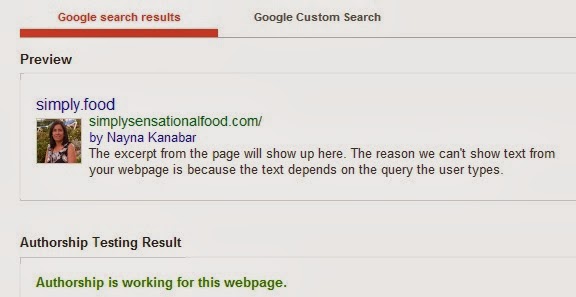
To see if Google Authorship has worked click on this link:
Type your blog url in the box and check if authorship has worked.
Google authorship can
take anything up to three months to
start working.
Share this post


Unknown
Nayana .. I saw your post regarding google authorship.i had never heard about it before. After your post I quickly did a google search to know what it was then followed your simple instructions. It worked ..it just took 10 minutes .. Your instructions were sooo simple to understand .. Thank you sooo much .. Looking forward for more useful posts like this ..
prwilson
Interesting. I know next-to-nothing about blogging and these basic tips are very informative.
citrusspiceuk@gmail.com
So glad that you found this post informative.
Unknown
What a great post! It's something I've not heard of before so may give it ago soon! Jess x
I'm on WordPress but I love these informative posts, especially when they are as easy to understand as yours.
fiona maclean
It's a shame it's SO hard to set up google authorship – and you would have thought that blogger would be easy! Good for you, explaining it all so clearly
Unknown
worth a shot thankyou x
Sarah
I think I've done it! Thank you!
S xx
Fridayisforeverblog.com
Helen – Blogging Beautifully
Great post Nayna, very informative and I might give it a go
Helen X
Unknown
thanks for post i have already done this x
Copyright©2022 Nayna Kanabar/Citrusspice and Travels Powered by WordPress | Theme by TheBootstrapThemes
Cookie Consent